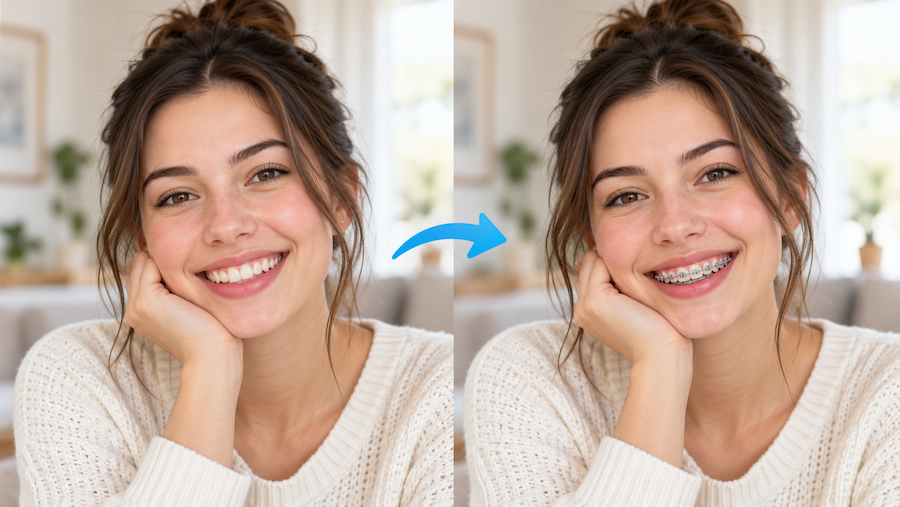
Have you ever looked in the mirror and wondered what you’d look like with braces?
Maybe your dentist mentioned orthodontic treatment. Maybe a friend recently got braces, and you started imagining yourself with a similar smile. Or maybe you’re just curious whether colorful braces would actually suit you.
It’s a surprisingly difficult thing to picture.
You can look at dozens of photos of people wearing braces, but none of those faces is yours. And while braces are usually associated with straightening teeth, they also change the way a smile looks in photographs.
The good news? You don’t have to rely entirely on your imagination anymore.
With a decent selfie and a little help from an online photo editor, you can explore different braces styles without actually wearing them.
But there are a few things worth knowing before you start.
Why Is It So Hard to Imagine Yourself with Braces?
Most of us are used to seeing our own smiles a certain way.
We know what our teeth look like, how our lips move when we laugh, and which camera angles make us look our best. Even a relatively small change around the mouth can make a familiar face feel different.
That’s part of what makes braces interesting.
Traditional metal braces have a distinctive appearance. The brackets catch the light, the wire creates a thin line across the teeth, and colored elastic bands can make the whole look more noticeable.
Ceramic braces, on the other hand, tend to blend in more with natural tooth color.
It’s easy to understand the difference when looking at product photos. Imagining those same details on your own teeth is another matter.
And that’s where trying different looks on a photo can be genuinely useful.
How to Add Braces to a Photo Without Photoshop
A few years ago, adding believable braces to a portrait would have been a fairly tedious editing job.
You’d need to find an image of orthodontic brackets, resize everything to fit your teeth, adjust the perspective, and somehow make the lighting match.
Even then, the final image might look like a sticker pasted over your smile.
Fortunately, you don’t need to spend an afternoon working with Photoshop layers just to satisfy your curiosity.
An online braces filter offers a much simpler way to explore the idea.
The process is straightforward:
- Choose a clear photo. Pick a picture where you’re smiling naturally and your teeth are visible.
- Upload your image. Use a front-facing portrait with decent lighting.
- Pick a braces style. Start with something familiar, such as silver metal braces.
- Generate the preview. Let the tool create an edited version of your smile.
- Compare the results. Look at the original photo and the braces version side by side.
That’s really the basic idea.
However, don’t judge the entire concept based on one awkward selfie. Photo quality can make a big difference, especially when the editing involves small details like teeth.
A blurry image taken across a room probably won’t give you the same useful visual preview as a sharp, well-lit portrait.
Metal, Ceramic, or Clear Braces: Which Look Would You Choose?
This is where things get more interesting.
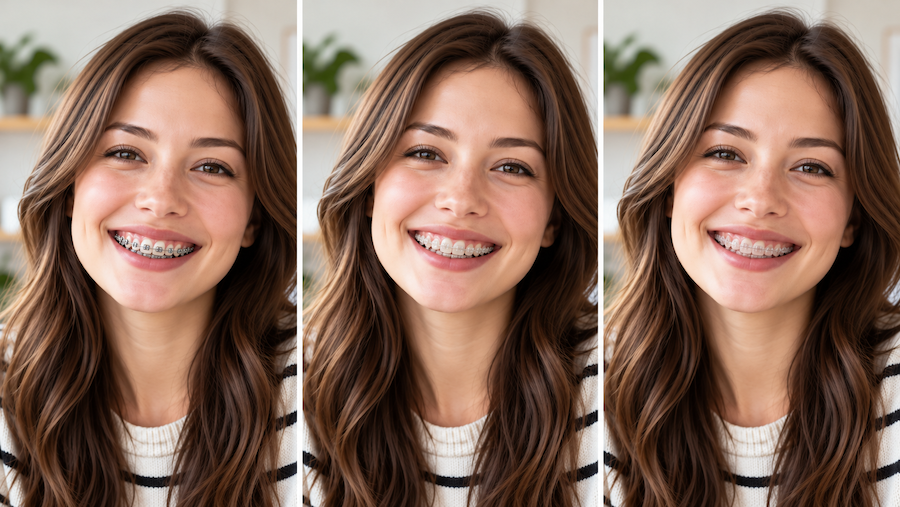
When people think of braces, they often picture the classic silver metal version. But orthodontic appliances come in different materials and appearances, and the differences can be quite noticeable in photos.
Metal Braces: The Familiar Look
Metal braces are probably the easiest style to recognize.
The silver brackets stand out against the teeth, giving the smile a more noticeable appearance.
They can look surprisingly good in casual pictures, particularly when someone has a big, relaxed smile.
If you’re curious about the classic braces look, this is a sensible place to start.
Ceramic Braces: A Subtler Appearance
Ceramic braces generally use tooth-colored or relatively translucent brackets.
They tend to look less noticeable than traditional metal brackets, although they certainly don’t disappear completely.
For someone who prefers a more understated look, ceramic-style braces are worth exploring.
Clear Braces: Keeping Things Low-Key
Clear bracket styles aim for a less obvious appearance.
One thing to remember is that clear brackets aren’t the same as removable clear aligners. They are different types of orthodontic appliances.
A photo preview can help you explore the visual difference, but it can’t tell you which treatment is medically appropriate.
That decision belongs in a conversation with a qualified orthodontist.
What About Gold, Pink, Blue, and Rainbow Braces?
Here’s something that doesn’t always get enough attention: braces can also be a way to express personal style.
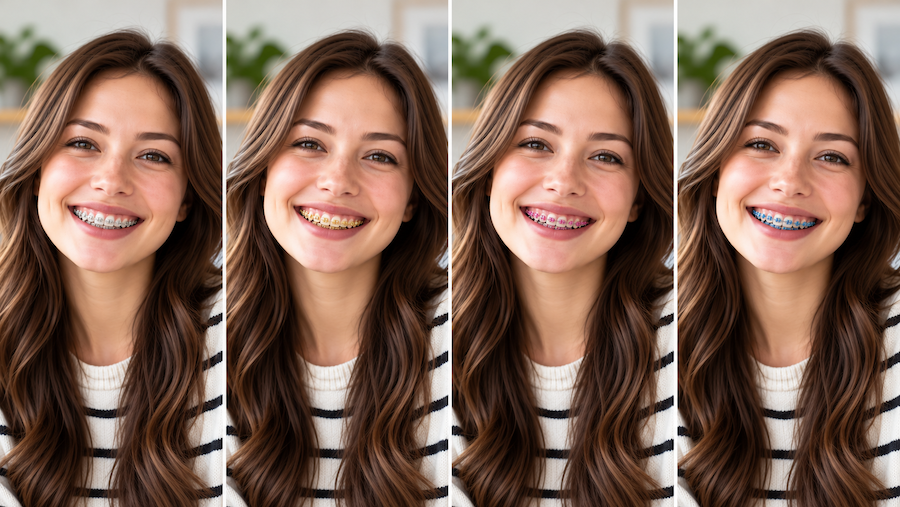
Some people prefer the classic silver look. Others like experimenting with colors.
Gold braces can create a warmer, more noticeable appearance. Rose gold has a softer tone, while pink and purple can make a smile feel playful.
Blue and black are also worth comparing, especially against different tooth shades and skin tones.
And rainbow braces? They’re hard to miss.
It’s worth pointing out that colored braces can refer to different things in real orthodontics. Some looks involve colored elastics, while others involve different bracket finishes or materials. An AI-generated image may simplify those differences.
Still, exploring them in a photo can be fun.
For anyone wondering how these styles might change their appearance, an AI braces filter can provide visual examples using their own smile.
AILabTools includes ten style options, covering classic metal and ceramic looks as well as gold, rose gold, and several colorful choices.
Rather than choosing a favorite based on a sample model, you can compare how the different styles appear on your own photograph.
My suggestion would be to start with silver, ceramic, and one unexpected color.
You may discover that the style you thought you’d like isn’t actually the one you prefer in a picture.
A Few Photo Tips That Make Braces Look More Natural
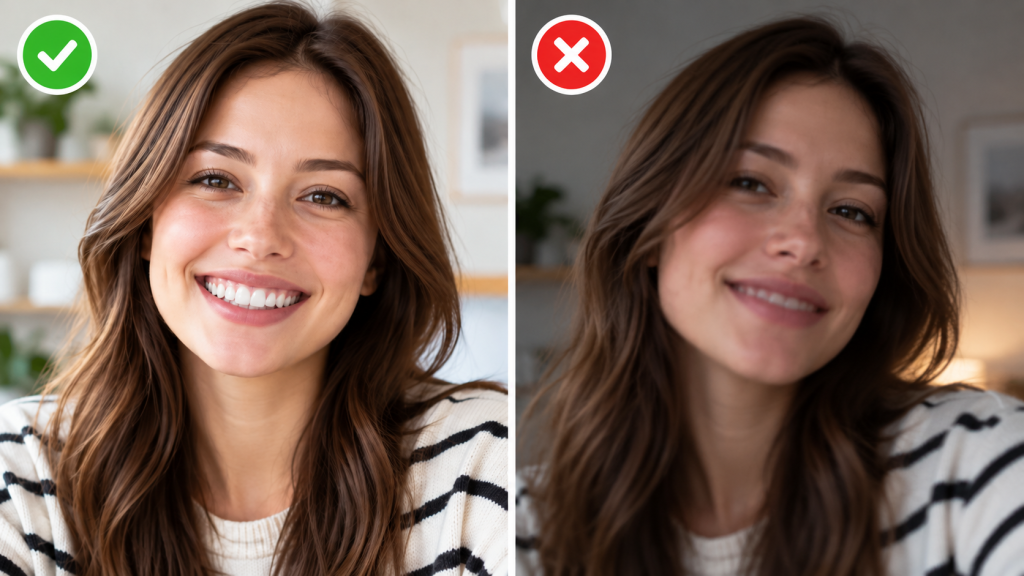
Not every edited braces photo looks convincing.
Sometimes the brackets appear too large. Sometimes the wire looks unnaturally straight, or the artificial details don’t quite follow the shape of the person’s teeth.
The good news is that a few simple photography choices can help.
Use a natural smile.
You don’t need to force the biggest grin possible. A relaxed expression with clearly visible teeth is usually a better starting point.
Face the camera.
A slightly angled portrait can work, but extreme side views make it harder to see the teeth properly.
For a first attempt, a straightforward front-facing photograph is the safest choice.
Avoid heavy beauty filters.
Some filters smooth facial features so aggressively that the teeth lose their natural detail. That makes additional editing more difficult.
Try to use an original photo whenever possible.
Pay attention to lighting.
Soft daylight can be particularly helpful because it reveals the shape of the teeth without producing harsh shadows.
Standing near a window is often enough.
Check the rest of the face.
After generating a preview, compare the edited image with the original.
The mouth should still look like yours. Your facial expression, lip shape, skin texture, and surrounding features shouldn’t suddenly seem unfamiliar.
Most importantly, the braces should follow the visible teeth rather than floating in front of them.
These small details are what separate a fun, believable edit from something that looks obviously artificial.
Is a Braces Filter the Same as Seeing Your Future Smile?
Not quite, and this distinction matters.
An AI-generated braces photo can show you a possible visual appearance of braces on your teeth.
It cannot tell you how your teeth will move during treatment, how long treatment will take, or what your smile will look like after the braces come off.
Those questions depend on factors such as tooth alignment, bite, jaw structure, and the specific treatment plan.
A dentist or orthodontist may use clinical records, X-rays, photographs, and specialized planning software to evaluate those details.
An ordinary photo filter doesn’t replace any of that.
Think of the edited picture as a style preview, not a medical simulation.
It’s useful for answering the casual question, “Would I like how braces look on me?”
It’s not designed to answer, “What will my teeth look like after eighteen months of treatment?”
Keeping those two questions separate makes the experience a lot more useful.
Why Before-and-After Photos Are Worth Comparing
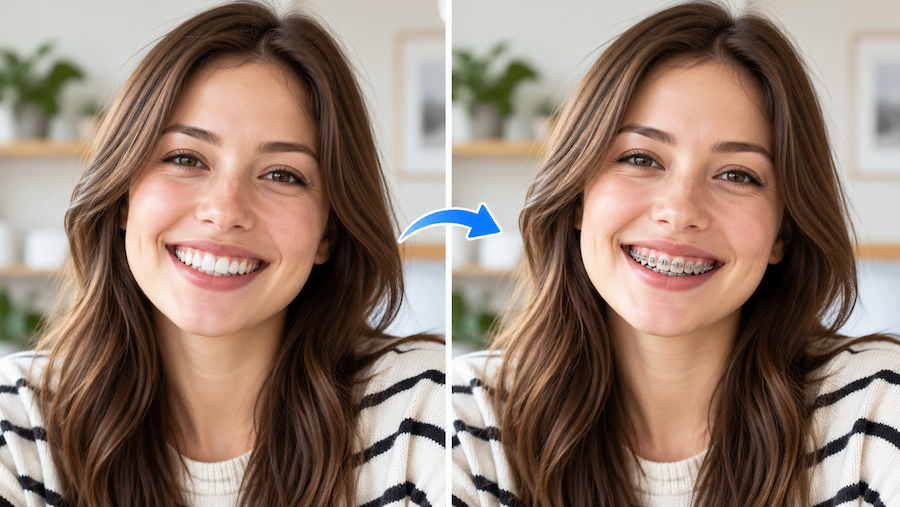
There’s a reason before-and-after comparisons are so common in photo editing.
Seeing two versions of the same image side by side makes small differences easier to notice.
For braces, this is especially helpful.
You can compare how visible the brackets are, whether a particular color draws attention to the teeth, and how the overall smile changes visually.
You may also notice details that weren’t obvious in the first preview.
For example, a certain style might look attractive when zoomed in but feel too prominent when you view the entire portrait.
That’s why it’s worth checking the image at both sizes.
If you want to try on braces online, save or compare a few different previews rather than focusing on just one version.
You can even ask a friend which style looks most natural.
Just remember that everyone’s preferences are different. Some people love the bold look of colorful braces, while others would rather keep their orthodontic appliances as subtle as possible.
There’s no universally correct choice when you’re simply exploring appearance.
Are Braces Filters Just for People Considering Treatment?
Not at all.
Sometimes curiosity is enough.
Braces filters can also be entertaining for social media portraits, photo editing experiments, or simply seeing how different styles would look.
A person who wore braces years ago might be curious about how they’d look with today’s color options.
Someone else might want to create a playful comparison for a short video or share a funny edited selfie with friends.
Those are perfectly reasonable uses, too.
If you’re sharing an edited image publicly, it’s a good idea to mention that it’s an AI-generated preview, particularly if the braces look realistic enough to be mistaken for the real thing.
A small bit of transparency avoids unnecessary confusion.
So, What Would You Look Like with Braces?
There’s only so much you can tell from looking at someone else’s smile.
A pair of silver braces that looks great on a friend might feel completely different on your own face. You might prefer something less noticeable, like ceramic brackets, or find that a bright color is more your style than you expected.
That’s what makes experimenting with a photo worthwhile. You can explore the possibilities without committing to anything.
Start with a clear picture, try a couple of styles, and look at the results both close up and from a normal viewing distance.
Don’t worry if some of the previews look a little strange. They’re edited images, after all, and small details around the teeth aren’t always easy to reproduce perfectly.
And if you’re seriously thinking about getting braces, bring your questions to an orthodontist. A photo filter can help you explore how braces might look, but it can’t tell you which treatment would work for your teeth.
You might end up loving the classic metal look. You might discover that colorful braces are more fun than you thought.
Or you might simply have a laugh at a few pictures and move on.
Either way, it’s an easy way to answer a question you’ve probably wondered about at least once.