> ## Documentation Index
> Fetch the complete documentation index at: https://ailabtools.mintlify.site/llms.txt
> Use this file to discover all available pages before exploring further.
# Hitchcock Special Effects API
> Hitchcock Special Effects API converts portrait photos into 2D-to-3D slow-motion visual effects using portrait segmentation.
\[Important: API Service Retirement Notice]
Dear Developers,
Thank you for your continued trust and support of the AILabTools API.
To better focus on delivering more efficient, stable, and future-ready solutions, we are announcing the retirement of this API.
Due to its outdated architecture and limitations in performance and scalability, this API will be permanently discontinued and will no longer be available starting from the date of this announcement. Any applications or integrations that still rely on this API may experience service interruptions if no action is taken.
We strongly recommend that you evaluate alternative solutions and plan your migration as soon as possible to ensure a smooth transition and uninterrupted service for your users.
If you have any questions or need assistance during this transition, our support team is ready to help:
📧 [support@ailabtools.com](mailto:support@ailabtools.com)
We sincerely appreciate your understanding and cooperation. Thank you for being part of AILabTools. We remain committed to providing you with more powerful and reliable services.
Best regards,
AILabTools Support Team
## Request
* **URL**: `https://www.ailabapi.com/api/portrait/effects/hitchcock-effects`
* **Method**: `POST`
* **Content-Type**: `multipart/form-data`
### Image requirements
* **Image format**: `JPEG` `JPG` `PNG` `BMP`
* **Image size**: No more than 5 MB.
* **Image resolution**: Larger than 64x64px, smaller than 2048x2048px.
### Headers
| Field | Required | Type | Description |
| :----------------- | :------- | :------- | :---------------------------------------------------- |
| `ailabapi-api-key` | YES | `string` | Application API KEY. [Get API KEY](/docs/get-api-key) |
### Body
| Field | Required | Type | Scope | Default | Description |
| :------------- | :------- | :-------- | :---------------------- | :------------- | :----------------------------------------------------------------------------------------------------------------------------------------------------------------------------------------------------------------------------------------------------------------------------------------------------------------------------------- |
| `version` | YES | `string` | `v2` | | Version. |
| `image_target` | YES | `file` | | | |
| `mode` | NO | `integer` | `0`, `1`, `2`, `3`, `4` | `0` | ``0`: Push forward shot, default with flowing effect.`, ``1`: Wide-angle camera movement.`, ``2`: Hitchcock camera movement.`, ``3`: Swing camera movement.`, \`\`4`: Bounce camera movement.` |
| `long_side` | NO | `integer` | \[0, 1920] | `960` | The length of the video's longer side for rendering. The larger the value, the longer it takes, growing exponentially in powers of two. |
| `frame_num` | NO | `integer` | | `90` | Video frame rate (without speed change). The larger the value, the longer it takes, increasing linearly. |
| `fps` | NO | `integer` | | `30` | Video frame rate. `frame_num`/`fps` determines the video duration. |
| `use_flow` | NO | `integer` | `-1`, `0`, `1` | `-1` | ``-1`: The algorithm determines whether to enable the flow effect based on the `mode` value.`, ``0`: Forcefully disable the flow effect.`, \`\`1`: Forcefully enable the flow effect.` |
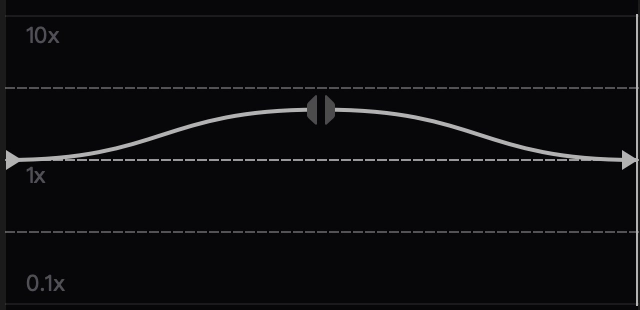
| `speed_shift` | NO | `string` | | Constant Speed | `Each pair of adjacent values represents the x and y values of a control point.`, `x range [0, 1]: Progress from the beginning to the end of the original video.`, `y range [0.1, 10]: Speed rate.`, `Each pair of adjacent control points represents a speed change curve, with the curve function being a trigonometric function.` |
#### `speed_shift`
For example, `0,1,0.5,4,0.5,4,1,1` represents the curve in the following diagram.
## Response
**Response Field Handling Flow**
1. **Handle `Public Response Fields`**
Parse and validate the `Public Response Fields`, checking the status code or response message to ensure the request is successful and error-free.
2. **Handle `Business Response Fields`**
If the `Public Response Fields` are valid and error-free, proceed with processing the business logic in the `Business Response Fields`.
### Public Response Fields
Viewing Public Response Fields and Error Codes
### Business Response Fields
| Field | Type | Description |
| :------- | :------- | :-------------------------------------------------------- |
| `data` | `object` | The content of the result data returned. |
| +`video` | `string` | Returns the base64 encoded string of the generated video. |
### Response Example
```json theme={null}
{
"request_id": "",
"log_id": "",
"error_code": 0,
"error_msg": "",
"error_detail": {
"status_code": 200,
"code": "",
"code_message": "",
"message": ""
},
"data": {
"video": ""
}
}
```