Beauty salons don’t need “more data.” They need a repeatable, trustworthy skin check that customers understand and that staff can use to recommend services confidently. A desktop skin analysis station—a small, controlled, in-store setup with a camera and standardized lighting—turns skin analysis into a reliable workflow that increases consultation quality, conversion, and retention.
This article is a practical, end-to-end solution blueprint for salon owners and technical teams. It covers device setup, customer flow, software architecture, privacy, ROI, and a real integration example using an AI skin analysis API (Skin Analyze Advanced).
Why a Desktop Skin Analysis Station Works Better Than Mobile-Only Checks
Mobile selfies vary wildly (lighting, angle, filters), which makes results harder to trust. A salon desktop device solves this by standardizing the capture environment:
- Fixed distance and angle
- Consistent ring light / color temperature
- Clean background
- Operator-guided capture (staff or self-service)
This improves result stability and makes reports comparable across visits—exactly what you need for “before & after” tracking.
The Ideal Desktop Device Setup (Two Practical Tiers)
Tier A: Standard Desktop Station (high ROI, easy to maintain)
- 13–16” touch display (all-in-one or touch monitor)
- Mini PC (Windows/Linux)
- 1080p/2K USB camera (autofocus recommended)
- Adjustable ring light (fixed brightness + fixed color temp)
- Mount/stand to keep camera and light stable
Tier B: Premium Consultation Station (for upscale salons)
- Everything in Tier A, plus:
- Higher-quality lens (low distortion)
- QR code scanner for membership binding
- Small printer for report summaries
- Better light diffusion (reduces glare/oily shine)
Capture Standards (The #1 Success Factor)
Even the best AI is limited by input quality. Your station should enforce a simple capture SOP:
- Face fully visible (no mask/hat covering key areas)
- Bright, even lighting (ring light fixed)
- Minimal head rotation and tilt
- Camera close enough so the face is large and clear
Most skin analysis APIs also recommend a sufficiently large face region in the photo and provide quality checks to reject poor inputs. In practice: quality control + guided retakes are essential to protect trust.
A Customer Flow That Converts (Not Just “Shows Scores”)
A salon skin analysis station is valuable when it becomes part of a sales and retention loop:
Step 1) Consent & Purpose
A clear screen explains:
- The analysis is for cosmetic consultation, not medical diagnosis
- What data is processed and how it’s stored
- Customer can opt out (and still get a manual consultation)
Step 2) Guided Photo Capture
- Face alignment frame
- Simple prompts (“Look straight,” “Move closer,” “Remove glasses if possible”)
- Countdown capture
Step 3) Two Reports: Customer-Friendly + Staff-Professional
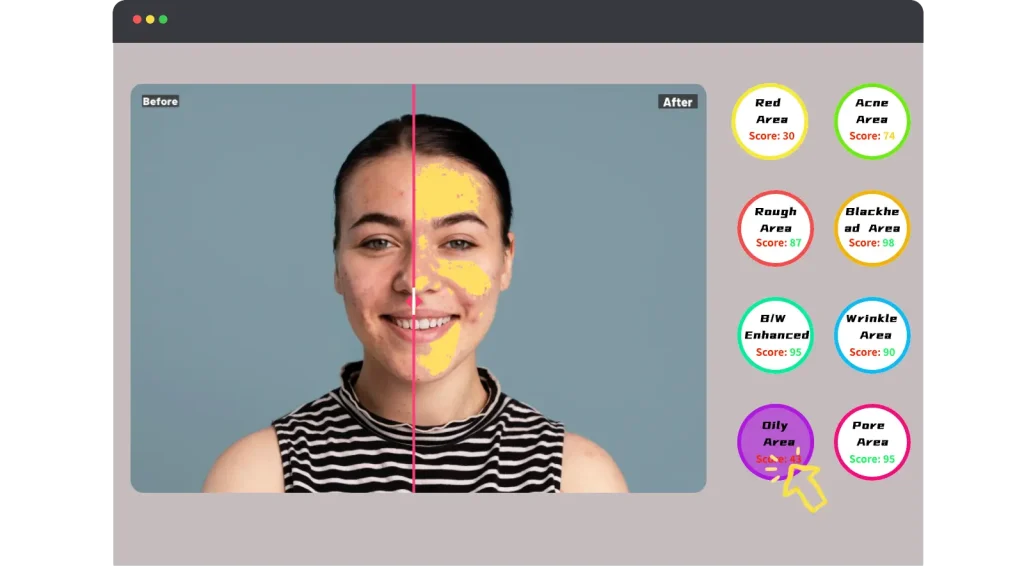
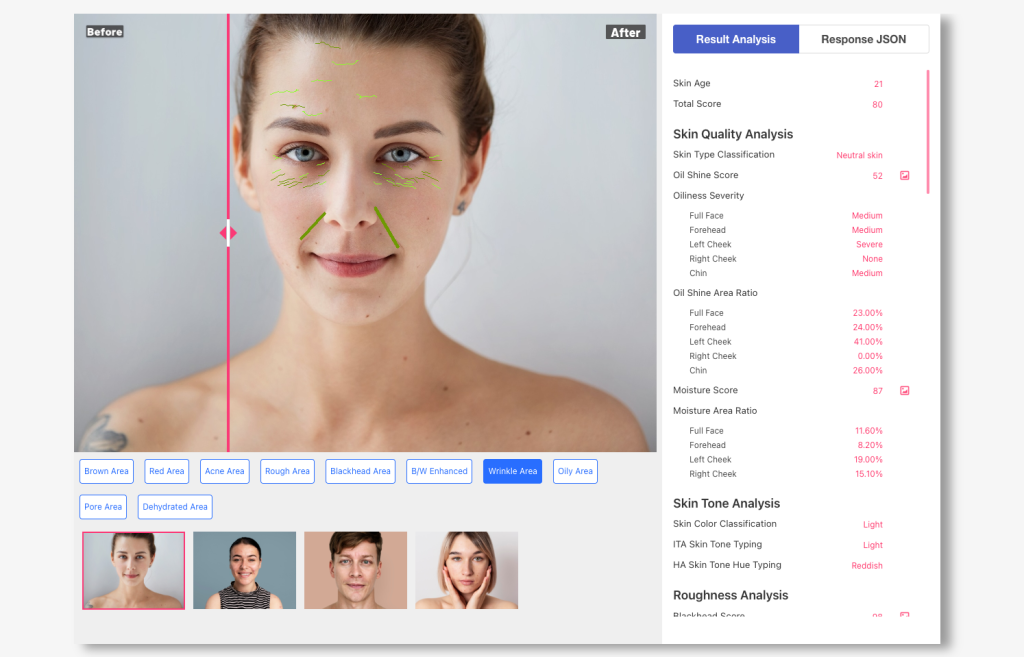
Customer Report (simple & visual)
- Top 3 findings (easy language)
- Visual evidence (e.g., redness/irritation map, acne/spot markers)
- 3 recommended next actions
Staff Report (professional, actionable)
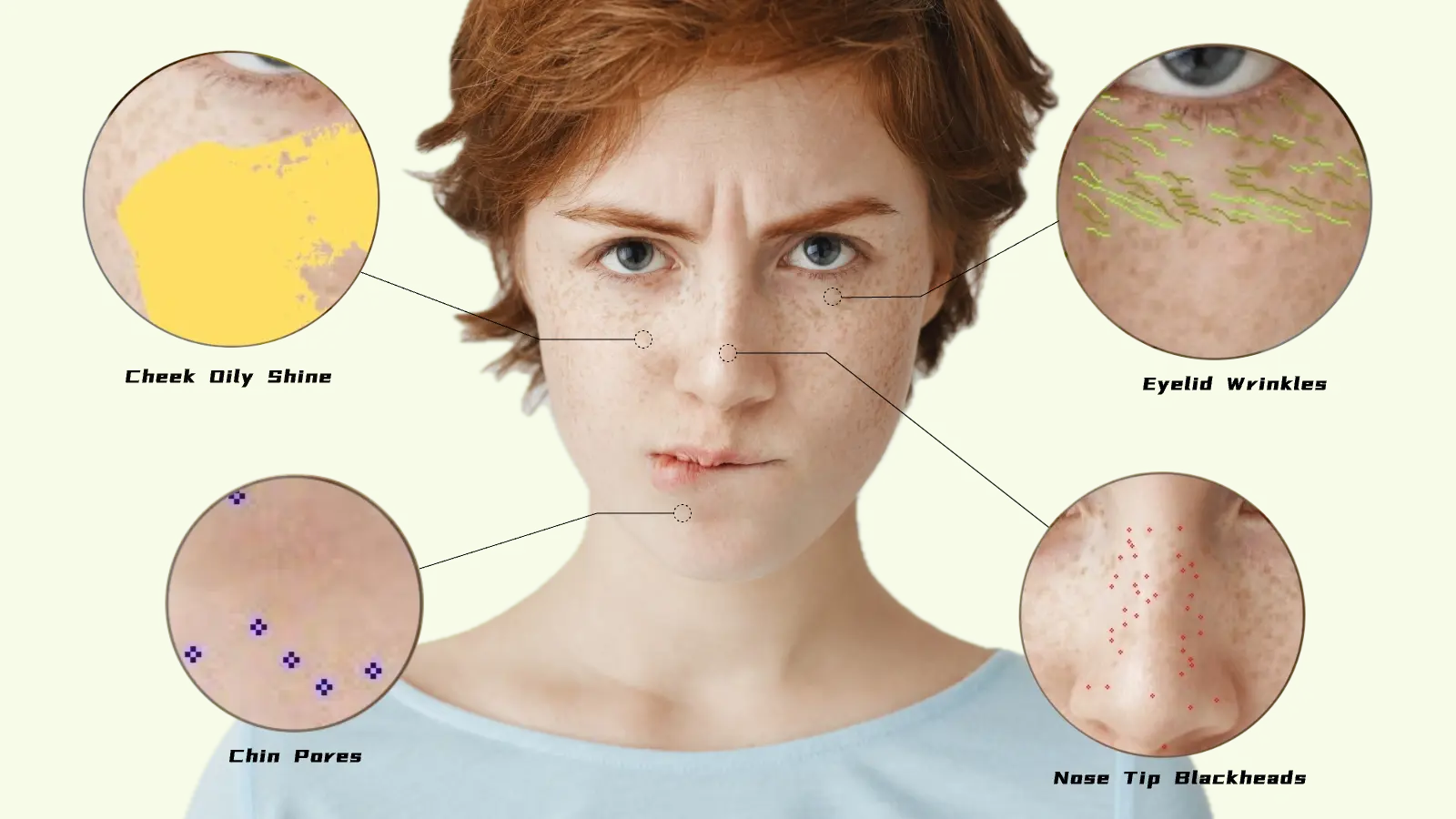
- Region-level pore/blackhead metrics
- Wrinkle/eye-area indicators
- Sensitivity/redness intensity and coverage
- Confidence signals (to avoid over-claiming)
Step 4) Recommendation Engine (Services + Home Care)
Map findings to your real offerings:
- Sensitivity/redness → calming repair treatment + barrier products
- Blackheads/pore congestion → deep cleansing + exfoliation protocol
- Fine lines → anti-aging routine + hydration/firming treatment
- Dark circles/eye bags → targeted eye treatment program
Step 5) Membership Binding + Re-check Plan
Create retention:
- QR code to save report to member profile
- Schedule follow-up in 7/14/30 days
- “Before & after” comparison becomes your strongest proof
Software Architecture (Secure, Maintainable, Scalable)
A reliable setup uses three layers:
- Desktop App (Kiosk UI)
- Capture + guidance
- Report rendering (charts, overlays, recommendations)
- Optional: print summary / QR share
- Salon Gateway Backend (your server)
- Stores API keys securely (never expose in the device UI)
- Rate limiting & abuse prevention
- Member binding and report storage
- Audit logs and staff permissions
- AI Skin Analysis API
- Receives the photo
- Returns structured results + optional visualization maps
This architecture keeps secrets safe and allows you to evolve the product without touching hardware.
What the AI Skin Analysis API Should Provide (Practical Output Checklist)
When choosing an API, prioritize outputs that support a salon workflow:
- Face rectangle (for alignment and audit)
- Structured skin metrics (pores by region, blackheads, wrinkles, eye area, etc.)
- Sensitivity / redness indicators
- Visual maps (e.g., redness area map to overlay on the face)
- Object rectangles (acne, moles, spots) with confidence scores
- Quality control mode to reject bad images and reduce false results
Integration Example (Skin Analyze Advanced API)
Below is an example integration approach using an AI “Skin Analyze Advanced” endpoint (multipart upload, API key header). This is a typical pattern used in production:
Recommended Parameters for Salon Devices
- Enable face quality control: reject low-quality photos and ask for retake
- Request rectangle confidence: filter low-confidence acne/spot boxes in UI
- Request a redness map: show an overlay that customers instantly understand
Next.js Gateway Route (Protect Your API Key)
// app/api/salon/skin-analysis/route.ts
import { NextResponse } from "next/server";
export const runtime = "nodejs";
export async function POST(req: Request) {
  const form = await req.formData();
  const image = form.get("image");
  if (!image) {
    return NextResponse.json({ error: "Missing image" }, { status: 400 });
  }
  // Forward to AI skin analysis service
  const upstream = new FormData();
  upstream.append("image", image as File);
  // Salon-friendly options: quality gating + confidence + redness map
  upstream.append("face_quality_control", "1");
  upstream.append("return_rect_confidence", "1");
  upstream.append("return_maps", "red_area");
  const r = await fetch(
    "https://www.ailabapi.com/api/portrait/analysis/skin-analysis-advanced",
    {
      method: "POST",
      headers: {
        "ailabapi-api-key": process.env.AILAB_API_KEY!,
      },
      body: upstream,
    }
  );
  const data = await r.json();
  return NextResponse.json(data, { status: r.status });
}
Why a gateway route matters: It prevents API key leakage, adds rate limiting, and lets you store only the data you need (typically structured results, not raw photos).
Privacy & Compliance (Do This to Protect Trust)
A beauty salon should follow a “minimum necessary” approach:
- Show explicit consent before capture
- Offer manual consultation if customers decline
- Store structured results only (avoid storing face photos by default)
- Use staff role permissions (front desk vs. consultants vs. owner)
- Define a retention policy (e.g., auto-delete after 90 days unless member opts in)
This protects your brand and reduces risk—while still supporting follow-up comparisons.
Operational Playbook (How to Make It “Used Every Day”)
Train staff on three essentials:
- Capture quality (lighting, distance, alignment)
- Explain with visuals (redness overlay + top findings)
- Always schedule a re-check (7/14/30 days)
Also prepare a fallback plan:
- Network issues → queue and retry from gateway
- Low-quality photo → auto-retake prompt (do not force a report)
- Uncertain results → show “confidence” and recommend re-check
ROI: How This Device Pays Back
A desktop skin analysis station typically improves:
- Consultation conversion (customers trust visuals + consistency)
- Add-on sales (more targeted service and product bundles)
- Membership retention (repeat checks create a routine)
- Staff efficiency (structured report saves consultation time)
Even a small increase in daily conversion can justify the device and API cost quickly—especially if you make the “re-check plan” part of your membership program.
Final Recommendation: Start Small, Standardize, Then Scale
If you want the fastest path to success:
- Build one standard desktop station
- Enforce a strict capture SOP
- Launch two-tier reports (customer vs. staff)
- Add membership binding + re-check scheduling
- Expand to multiple stations after you validate conversion gains